

Loupe
Loupe is a desktop client for Kubernetes, licensed Apache-2.0. It reads
the kubeconfig kubectl already uses and issues requests directly to
the API server from your machine.
It is a Tauri application: a React and TypeScript frontend over a Rust core that holds the client connection. Builds are published for macOS, Linux and Windows, and it works against any conformant Kubernetes cluster — managed, self-hosted, or a local kind or OrbStack cluster.
Architecture
Section titled “Architecture”Loupe has no in-cluster component. There is no operator to install, no service account to create, and no telemetry.
Every request originates from the machine running the app, using the
credentials in the selected kubeconfig context. Authorisation is
therefore whatever RBAC already grants that user: Loupe can read what
kubectl can read, and is refused the same things.
Resource types are resolved through the API server’s discovery
endpoints rather than a compiled-in list, and lists are requested as
application/json;as=Table;g=meta.k8s.io;v=v1 so the server returns
the same rows and printer columns that kubectl get renders. Custom
resources are handled by the same path as built-in kinds, which is why
a CRD installed after the binary was built needs no upgrade to browse.
Install
Section titled “Install”Loupe ships as a native binary for macOS, Linux and Windows. The current release is v0.1.5 — see the release notes for what changed.
The cask resolves the correct architecture:
brew install --cask kryptonhq/tap/loupeAlternatively, download a .dmg from the
latest release —
aarch64 for Apple Silicon, x64 for Intel. The architectures are
built separately rather than as a universal binary, so each download
contains one slice.
Three formats are published per release, available from the latest release:
| Format | Install |
|---|---|
.deb |
sudo apt install ./Loupe_<version>_amd64.deb |
.rpm |
sudo dnf install ./Loupe-<version>-1.x86_64.rpm |
.AppImage |
chmod +x Loupe_<version>_amd64.AppImage && ./Loupe_<version>_amd64.AppImage |
Builds are produced on Ubuntu 22.04. The binary links against the glibc of its build host, so building on a newer runner would raise the minimum glibc required to start.
Each file has a detached GPG signature beside it in the release — see verifying a download.
Windows
Section titled “Windows”Download either installer from the latest release:
Loupe_<version>_x64_en-US.msi— the MSI packageLoupe_<version>_x64-setup.exe— the NSIS installer
Verifying a download
Section titled “Verifying a download”macOS builds are verified by Gatekeeper on open. Linux builds carry a
detached GPG signature per file — Loupe_<version>_amd64.deb.asc beside
Loupe_<version>_amd64.deb, and likewise for the .rpm and
.AppImage.
Import the release key, published in the repository at
packaging/linux/loupe-release.asc,
and check that its fingerprint is
CC01 D01D 4A8B 455D CC67 EED5 1D2D 0C2A 56D7 8DD0 — the same value is in
packaging/linux/README.md —
before trusting it:
curl -fsSLO https://raw.githubusercontent.com/kryptonhq/loupe/main/packaging/linux/loupe-release.ascgpg --import loupe-release.ascgpg --fingerprint "Loupe Release Signing"Then verify whichever format you downloaded:
| Format | Verify |
|---|---|
.deb |
gpg --verify Loupe_<version>_amd64.deb.asc Loupe_<version>_amd64.deb |
.rpm |
gpg --verify Loupe-<version>-1.x86_64.rpm.asc Loupe-<version>-1.x86_64.rpm |
.AppImage |
gpg --verify Loupe_<version>_amd64.AppImage.asc Loupe_<version>_amd64.AppImage |
Look for Good signature from "Loupe Release Signing". The warning that
the key is not certified with a trusted signature is expected unless you
have signed the key yourself.
First run
Section titled “First run”-
Start Loupe. It reads
~/.kube/config— the same filekubectluses — and lists every context it finds. -
Pick a context. Loupe connects using that context’s credentials. Whatever
kubectlcan see, Loupe can see; whatever RBAC forbids, Loupe cannot. -
Browse. Nodes, namespaces and pods have dedicated views. All other kinds are listed from the server-rendered table.
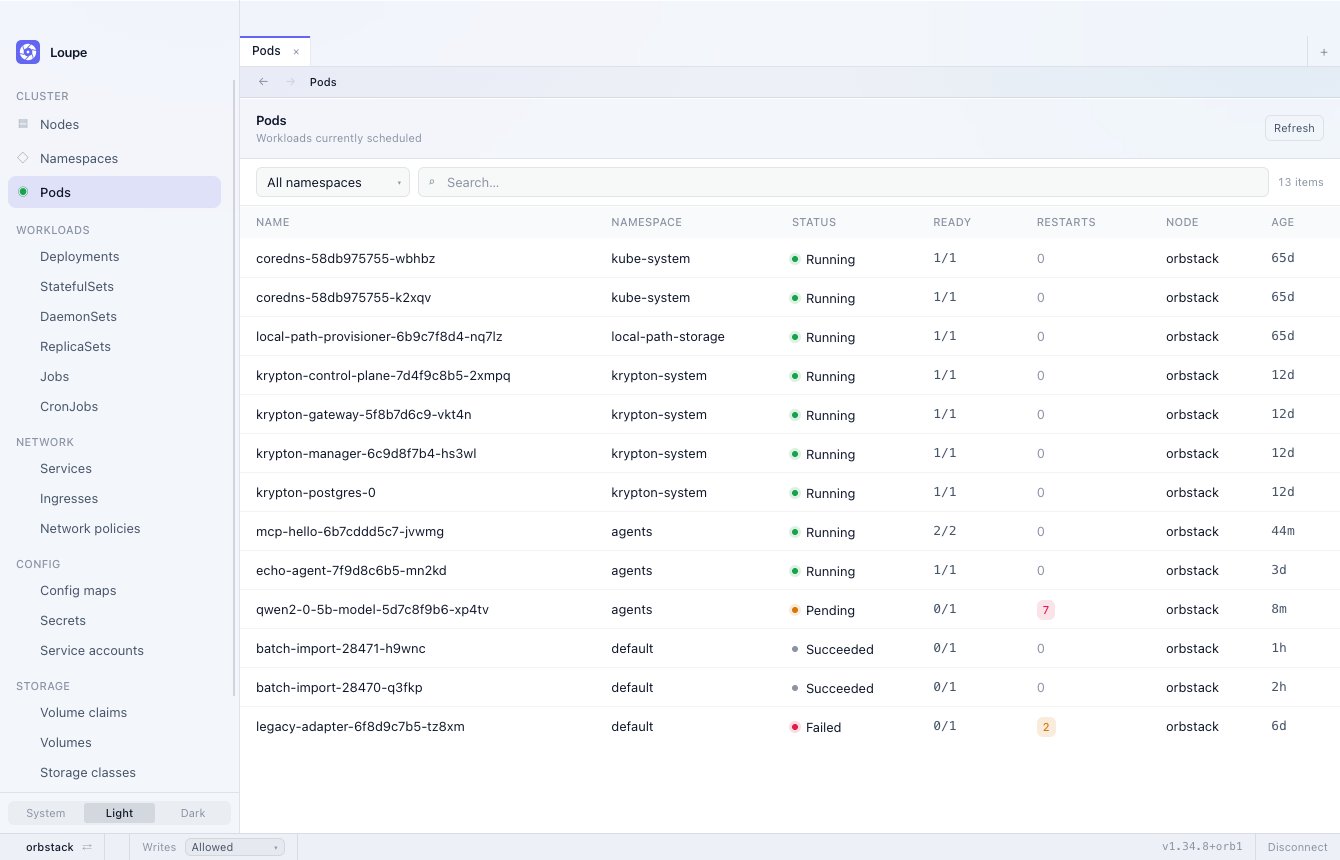
Connections are held per context, so switching cluster does not restart the application or discard the previous connection.
The workbench
Section titled “The workbench”Loupe holds several pieces of work at once rather than one. Opening an object does not cost you the list it came from, and following a chain — a pod, its ReplicaSet, the Deployment above it — is reversible in both directions.
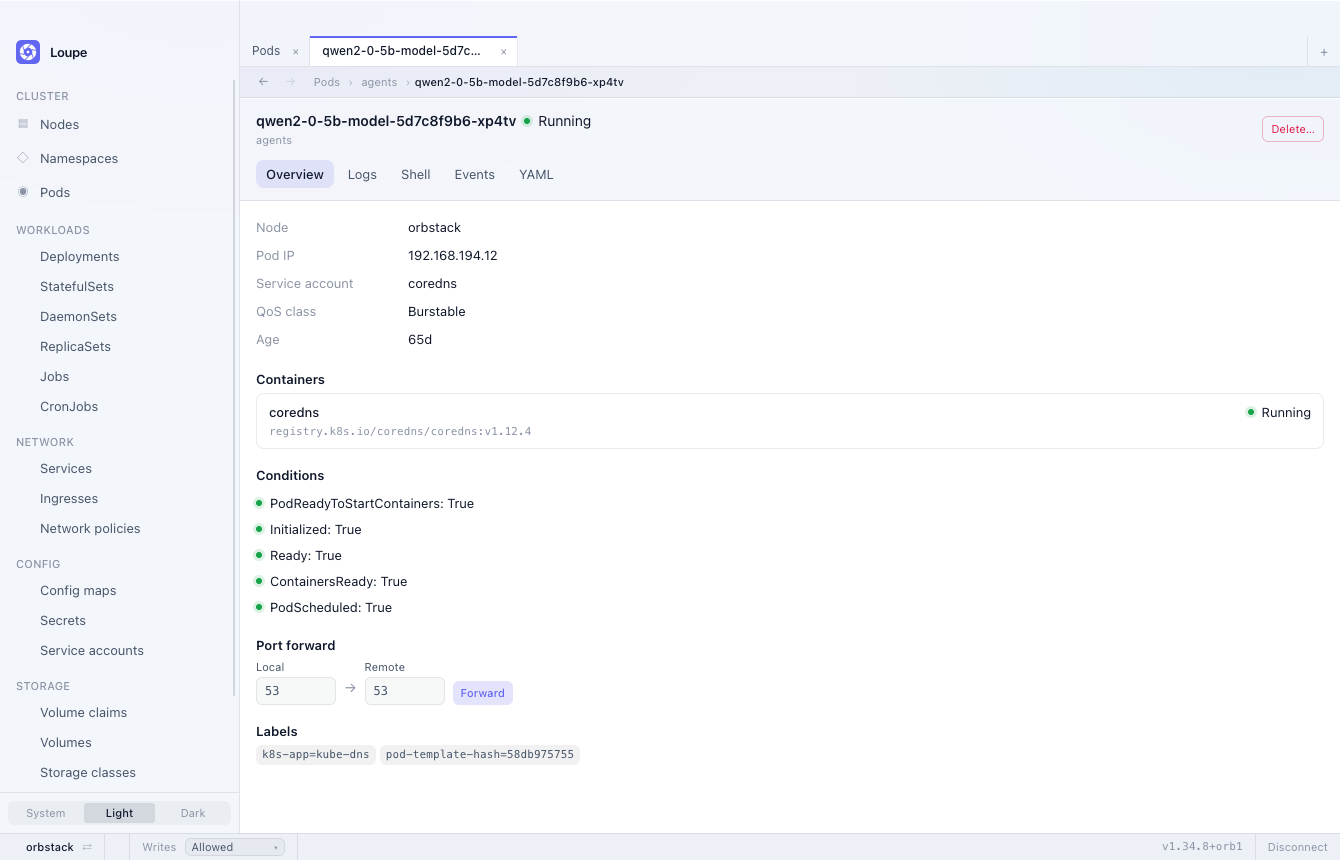
- Tabs.
⌘Topens one,⌘Wcloses it,⌘1–⌘9reach one by position, and⌘-clicking a row opens it in a tab of its own. - Back and forward, per tab, on
⌘[and⌘]. The breadcrumb above a detail view says where the object sits — kind, namespace, name — rather than replaying how you arrived. - A status bar carrying the cluster, its write guard, the server version and any pending update, on one line that does not move.
- Interface zoom on
⌘+,⌘-and⌘0, remembered across launches, from the View menu or the command palette.
Each listing remembers its own namespace, search and sort, so drilling into a row and coming back returns the view as you left it — and two tabs on the same kind can be scoped to different namespaces.
Capabilities
Section titled “Capabilities”Problems
Section titled “Problems”One view of everything currently broken across the cluster, opened from the top of the rail, from the status bar’s problem count, or as Problems in the command palette.
- Pods —
CrashLoopBackOffwith the last exit code,ImagePullBackOffandErrImagePullwith the image reference, container configuration errors,OOMKilledon the last termination,Pendingwith the scheduler’s own reason, not Ready past the grace period, and restarts above a threshold within the last hour - Workloads — Deployments, StatefulSets and DaemonSets short of their replicas past the grace period, stalled rollouts, failed Jobs, and CronJobs whose last run failed
- Nodes — not Ready, memory, disk and PID pressure, cordoned, and taints that are keeping pending pods off a node they would otherwise fit
- Events —
Warningevents from the last hour, one row per object and reason with a count, so forty identicalFailedSchedulingevents are one line - Storage — claims left
Pendingpast the grace period
Rows are ordered worst first, sortable by severity and age, filterable by namespace, and open the object they describe. Each tab keeps its own sort and namespace.
The view is kept current by watching those kinds — one list per kind and then changes — rather than by polling, so a fixed image drops off without a refresh. If RBAC does not allow listing one of them, that category shows a single “not permitted” row instead of an empty section that would read as healthy; the others are unaffected.
What counts as broken rather than still starting is configurable in
settings.json, and applies from the next connection. The file is in
the application’s config directory — ~/Library/Application Support/ai.krypton.loupe/ on macOS, ~/.config/ai.krypton.loupe/ on
Linux, and %APPDATA%\ai.krypton.loupe\ on Windows:
{ "problems": { "gracePeriodSeconds": 120, "restartThreshold": 5 }}The status bar counts critical and warning rows. Warning events and unavailable categories appear in the view but not in the count, so a busy cluster’s badge still means something. Metrics-based problems such as CPU throttling are not detected, and nothing is sent anywhere — there are no notifications or alerts.
Resource browsing
Section titled “Resource browsing”- Kubeconfig context discovery, connection, and switching between contexts
- Dedicated views for nodes, namespaces and pods, with search and paging
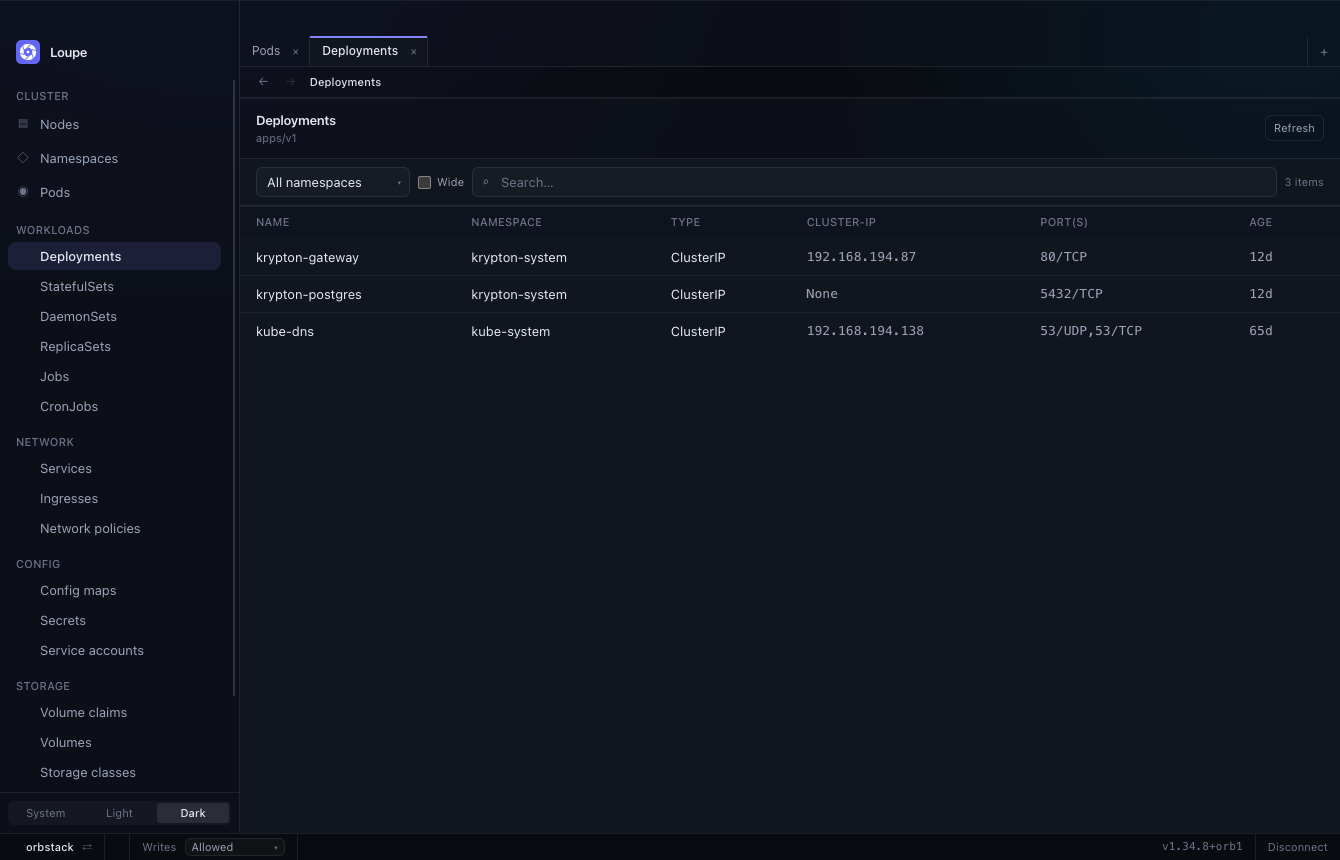
- Workloads, networking, config and storage — deployments, statefulsets, daemonsets, replicasets, jobs, cronjobs, services, ingresses, network policies, config maps, secrets, service accounts and persistent volume claims
- Custom resources, resolved through API discovery and rendered with the printer columns declared in the CRD
- Sortable columns, in the units the columns are actually in: ages sort as durations, ready counts as fractions, restarts as numbers. A sort over a partly loaded listing says so rather than implying it covered the cluster.
Detail views
Section titled “Detail views”- Pod — containers, termination reasons, conditions, labels, events and the full manifest
- Node — allocated CPU and memory against allocatable, taints, pressure conditions, and the pods bound to the node
- Namespace — pod phase counts, ResourceQuota utilisation, remaining finalizers on a terminating namespace, and the resources it contains
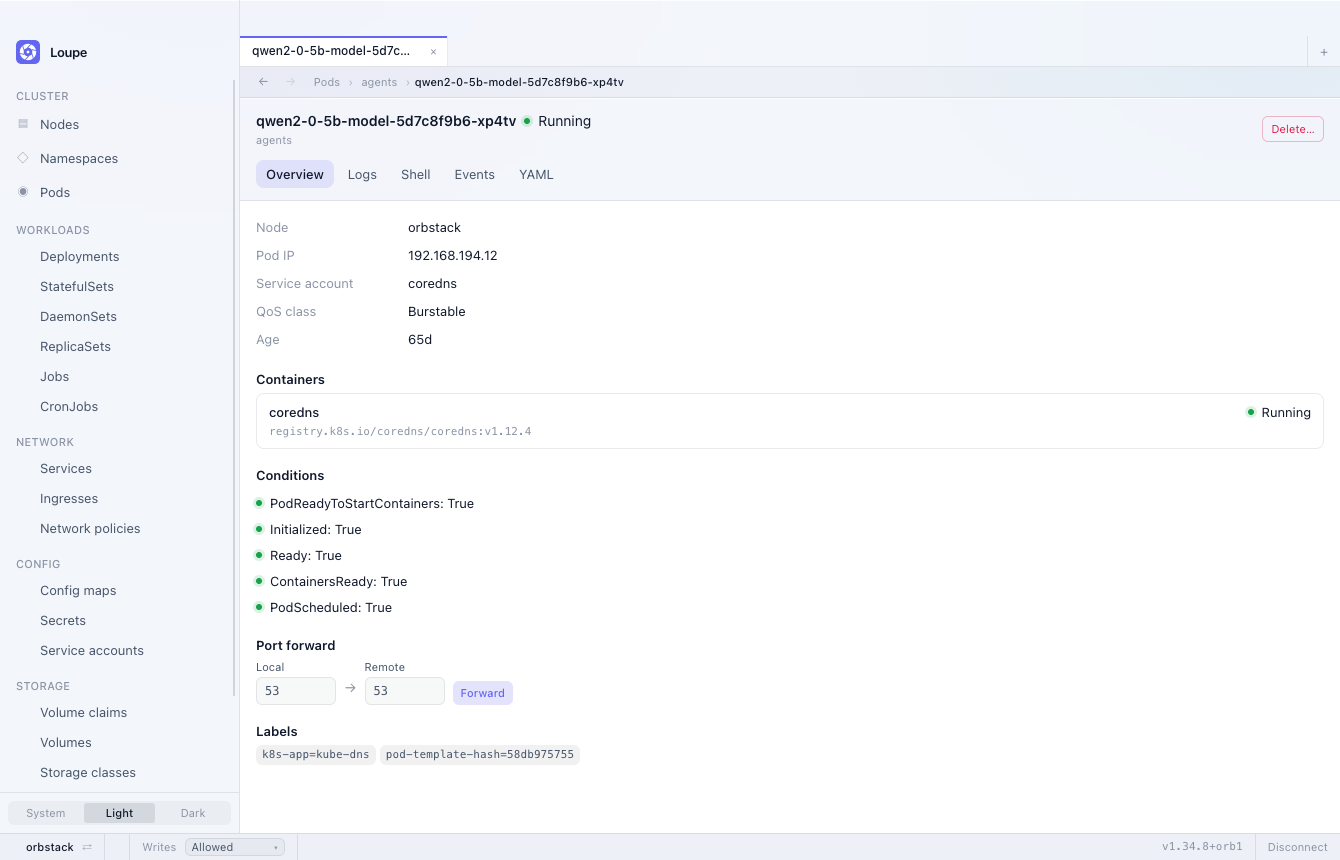
- Pod logs streamed from the API server, with container selection,
timestamps, and
previousfor a terminated container’s logs
Secrets
Section titled “Secrets”- Keys and byte sizes are listed without retrieving values. Each value
is fetched individually on request, and the YAML view redacts
data.
- Release values, rendered manifests, notes and revision history are
decoded from the release Secrets. The
helmbinary is not invoked.
Editing and actions
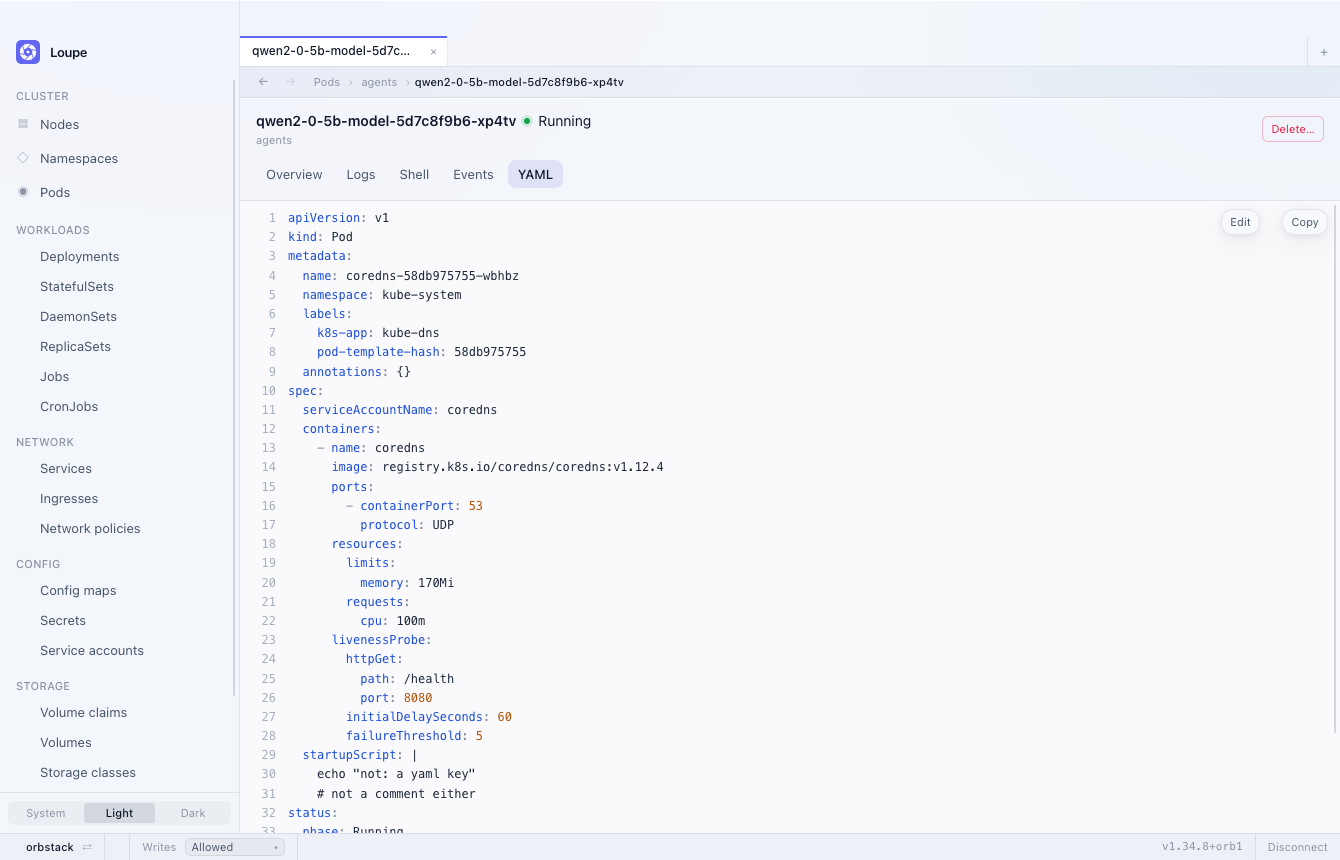
Section titled “Editing and actions”- The YAML view writes back with a full replace, so a concurrent modification is rejected by the API server rather than silently overwritten
- A diff is shown before every apply
- Scale, rollout restart, delete, cordon and drain, behind confirmations — and hidden entirely where RBAC would refuse them
- Per-context guards: a context can be marked protected, so every write is confirmed by typing its name, or read-only, so writes are refused outright. The guard is shown in the status bar and tints it, so a production cluster does not look like a local one.
Updates
Section titled “Updates”- Loupe checks once on launch and offers a new version in the status bar. Downloads are verified against a signing key compiled into the binary, so a compromised release host cannot ship an artifact the private key did not sign.
- Also available from the command palette as Check for updates.
- The
.debdeliberately does not self-update — the package manager owns those files.
Appearance
Section titled “Appearance”- Light, dark, or system-following, persisted in
settings.jsonalongside the application’s other configuration
Not yet implemented
Section titled “Not yet implemented”As of v0.1.5:
- Creating objects. Loupe edits what already exists; there is no New, and no apply from a local file.
- Cluster-wide search. The filter box matches the rows a listing has loaded, not the cluster.
- Schema-aware editing. The YAML editor has no completion and no validation before the apply round-trip.
Building from source
Section titled “Building from source”git clone https://github.com/kryptonhq/loupecd loupepnpm installpnpm tauri devpnpm dev alone serves the frontend in a browser, where the Tauri
bridge is absent. In that case the UI falls back to the fixtures in
src/dev/fixtures.ts, allowing layout work without a cluster. That
path is development-only and is excluded from production builds.
Contributing
Section titled “Contributing”Loupe uses the DCO rather than a
CLA. Sign commits with git commit -s; contributors retain their
copyright.
- CONTRIBUTING.md — development setup and pull request process
- GOVERNANCE.md — decision-making and maintainership
- SECURITY.md — vulnerability disclosure process
The project follows the CNCF Code of Conduct.
Licence
Section titled “Licence”Apache 2.0. See LICENSE.